# Gemini Skill
English | [中文](./README.md)
Automate Gemini web (gemini.google.com) via CDP (Chrome DevTools Protocol) — AI image generation, conversations, image extraction, and more.
## ✨ Features
- 🎨 **AI Image Generation** — Send prompts to generate images, with full-size high-res download support
- 💬 **Text Conversations** — Multi-turn dialogue with Gemini
- 🖼️ **Image Upload** — Upload reference images for image-to-image generation
- 📥 **Image Extraction** — Extract images from sessions via base64 or CDP full-size download
- 🔄 **Session Management** — New chat, temp chat, model switching, navigate to historical sessions
- 🧹 **Auto Watermark Removal** — Downloaded images automatically have the Gemini watermark stripped
- 🤖 **MCP Server** — Standard MCP protocol interface, callable by any MCP client (Claude, CodeBuddy, etc.)
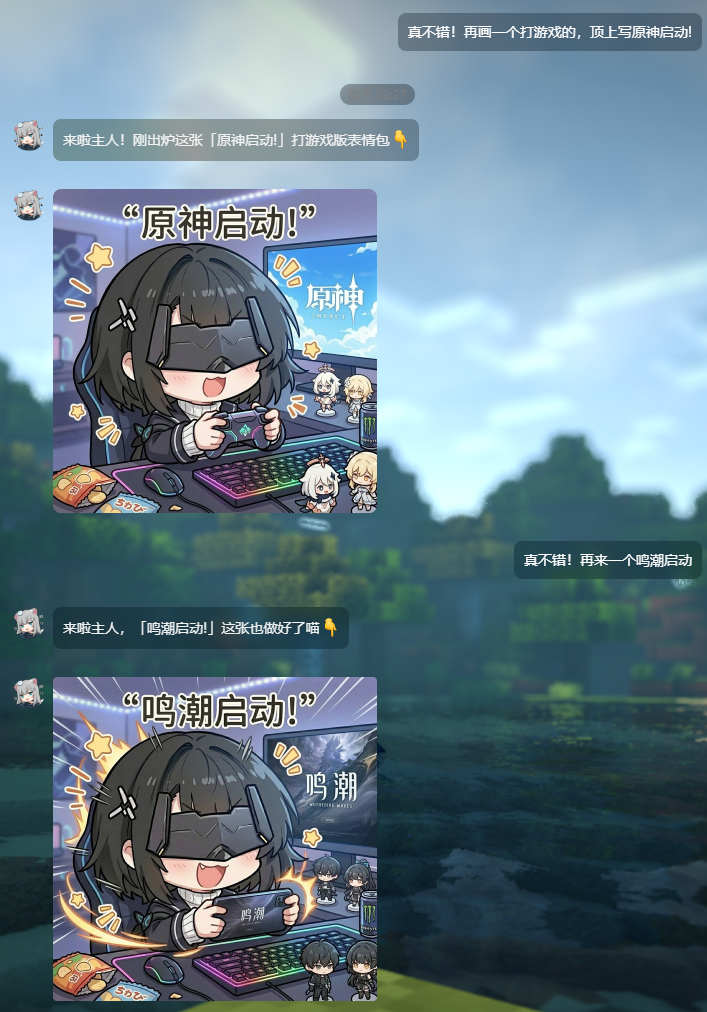
## 📸 Example
Generate game-style sticker images through AI conversation:
 ## 🏗️ Architecture
```
┌─────────────────────────────────────────────────────┐
│ MCP Client (AI) │
│ Claude / CodeBuddy / ... │
└──────────────────────┬──────────────────────────────┘
│ stdio (JSON-RPC)
▼
┌─────────────────────────────────────────────────────┐
│ mcp-server.js (MCP Protocol Layer) │
│ Registers all MCP tools, orchestrates │
└──────────────────────┬──────────────────────────────┘
│
▼
┌─────────────────────────────────────────────────────┐
│ index.js → browser.js (Connection Layer) │
│ ensureBrowser() → auto-start Daemon → CDP link │
└──────────┬──────────────────────────────┬───────────┘
│ HTTP (acquire/status) │ WebSocket (CDP)
▼ ▼
┌──────────────────────┐ ┌─────────────────────────┐
│ Browser Daemon │ │ Chrome / Edge │
│ (standalone process)│───▶│ gemini.google.com │
│ daemon/server.js │ │ │
│ ├─ engine.js │ │ Stealth + anti-detect │
│ ├─ handlers.js │ └─────────────────────────┘
│ └─ lifecycle.js │
│ 30-min idle TTL │
└──────────────────────┘
```
**Core Design Principles:**
- **Daemon Mode** — The browser process is managed by a standalone Daemon. After MCP calls finish, the browser stays alive; it auto-terminates only after 30 minutes of inactivity.
- **On-demand Auto-start** — If the Daemon isn't running, MCP tools will automatically spawn it. No manual startup required.
- **Stealth Anti-detect** — Uses `puppeteer-extra-plugin-stealth` to bypass website bot detection.
- **Separation of Concerns** — `mcp-server.js` (protocol) → `gemini-ops.js` (operations) → `browser.js` (connection) → `daemon/` (process management)
## 📦 Installation
### Prerequisites
- **Node.js** ≥ 18
- **Chrome / Edge / Chromium** — Any one of these must be installed on your system (or specify a path via `BROWSER_PATH`)
- The browser must be **logged into a Google account** beforehand (Gemini requires authentication)
### Install Dependencies
```bash
git clone https://github.com/WJZ-P/gemini-skill.git
cd gemini-skill
npm install
```
## ⚙️ Configuration
All configuration is done via environment variables or a `.env` file. Create a `.env` file in the project root:
```env
# Browser executable path (auto-detects Chrome/Edge/Chromium if unset)
# BROWSER_PATH=C:\Program Files\Google\Chrome\Application\chrome.exe
# CDP remote debugging port (default: 40821)
# BROWSER_DEBUG_PORT=40821
# Headless mode (default: false — keep it off for first-time login)
# BROWSER_HEADLESS=false
# Image output directory (default: ./gemini-image)
# OUTPUT_DIR=./gemini-image
# Daemon HTTP port (default: 40225)
# DAEMON_PORT=40225
# Daemon idle timeout in ms (default: 30 minutes)
# DAEMON_TTL_MS=1800000
```
`.env.development` is also supported (takes priority over `.env`).
**Priority order:** `process.env` > `.env.development` > `.env` > code defaults
## 🚀 Usage
### Option 1: As an MCP Server (Recommended)
Add the following to your MCP client configuration:
```json
{
"mcpServers": {
"gemini": {
"command": "node",
"args": ["/src/mcp-server.js"]
}
}
}
```
Once started, the AI can invoke all tools via the MCP protocol.
### Option 2: Command Line
```bash
# Start MCP Server (stdio mode, for AI clients)
npm run mcp
# Start Browser Daemon standalone (usually unnecessary — MCP auto-starts it)
npm run daemon
# Run the demo
npm run demo
```
### Option 3: As a Library
```javascript
import { createGeminiSession, disconnect } from './src/index.js';
const { ops } = await createGeminiSession();
// Generate an image
const result = await ops.generateImage('Draw a cute cat', { fullSize: true });
console.log('Image saved to:', result.filePath);
// Disconnect when done (browser stays alive, managed by Daemon)
disconnect();
```
## 🔧 MCP Tools
### Image Generation
| Tool | Description | Key Parameters |
|------|-------------|----------------|
| `gemini_generate_image` | Full image generation pipeline (takes 60–120s) | `prompt`, `newSession`, `referenceImages`, `fullSize`, `timeout` |
### Session Management
| Tool | Description | Key Parameters |
|------|-------------|----------------|
| `gemini_new_chat` | Start a new blank conversation | — |
| `gemini_temp_chat` | Enter temporary chat mode (no history saved) | — |
| `gemini_navigate_to` | Navigate to a specific Gemini URL (e.g. a saved session) | `url`, `timeout` |
### Model & Conversation
| Tool | Description | Key Parameters |
|------|-------------|----------------|
| `gemini_switch_model` | Switch model (pro / quick / think) | `model` |
| `gemini_send_message` | Send text and wait for reply (takes 10–60s) | `message`, `timeout` |
### Image Operations
| Tool | Description | Key Parameters |
|------|-------------|----------------|
| `gemini_upload_images` | Upload images to the input box | `images` |
| `gemini_get_images` | List all images in the current session (metadata only) | — |
| `gemini_extract_image` | Extract image base64 data and save locally | `imageUrl` |
| `gemini_download_full_size_image` | Download full-size high-res image | `index` |
### Text Responses
| Tool | Description | Key Parameters |
|------|-------------|----------------|
| `gemini_get_all_text_responses` | Get all text responses in the session | — |
| `gemini_get_latest_text_response` | Get the latest text response | — |
### Diagnostics & Management
| Tool | Description | Key Parameters |
|------|-------------|----------------|
| `gemini_check_login` | Check Google login status | — |
| `gemini_probe` | Probe page element states | — |
| `gemini_reload_page` | Reload the page | `timeout` |
| `gemini_browser_info` | Get browser connection info | — |
## 🔄 Daemon Lifecycle
```
First MCP call
│
├─ Daemon not running → auto-spawn (detached + unref)
│ → poll until ready (up to 15s)
│
├─ GET /browser/acquire → launch/reuse browser + reset 30-min countdown
│
├─ MCP tool finishes → disconnect() (closes WebSocket, keeps browser alive)
│
├─ Another call within 30 min → countdown resets (extends TTL)
│
└─ 30 min with no activity → close browser + stop HTTP server + exit process
(next call will auto-respawn)
```
**Daemon API Endpoints:**
| Endpoint | Description |
|----------|-------------|
| `GET /browser/acquire` | Acquire browser connection (resets TTL) |
| `GET /browser/status` | Query browser status (does NOT reset TTL) |
| `POST /browser/release` | Manually destroy the browser |
| `GET /health` | Daemon health check |
## 📁 Project Structure
```
gemini-skill/
├── src/
│ ├── index.js # Unified entry point
│ ├── mcp-server.js # MCP protocol server (registers all tools)
│ ├── gemini-ops.js # Gemini page operations (core logic)
│ ├── operator.js # Low-level DOM operation wrappers
│ ├── browser.js # Browser connector (Skill-facing)
│ ├── config.js # Centralized configuration
│ ├── util.js # Utility functions
│ ├── watermark-remover.js # Image watermark removal (via sharp)
│ ├── demo.js # Usage examples
│ ├── assets/ # Static assets
│ └── daemon/ # Browser Daemon (standalone process)
│ ├── server.js # HTTP micro-service entry
│ ├── engine.js # Browser engine (launch/connect/terminate)
│ ├── handlers.js # API route handlers
│ └── lifecycle.js # Lifecycle control (lazy shutdown timer)
├── references/ # Reference documentation
├── SKILL.md # AI invocation spec (read by MCP clients)
├── package.json
└── .env # Environment config (create manually)
```
## ⚠️ Notes
1. **First-time login required** — On the first run, the browser will open the Gemini page. Complete Google account login manually. Login state is persisted in `userDataDir`, so subsequent runs won't require re-login.
2. **Single instance only** — Only one browser instance can use a given CDP port. Running multiple instances will cause port conflicts.
3. **Windows Server considerations** — Path normalization and Safe Browsing bypass are built-in, but double-check:
- Chrome/Edge is properly installed
- The output directory is writable
- The firewall is not blocking localhost traffic
4. **Image generation takes time** — Typically 60–120 seconds. Set your MCP client's `timeoutMs` to ≥ 180000 (3 minutes).
## 📄 License
ISC
## LINUX DO
This project supports [LINUX DO](https://linux.do) community.
## 🏗️ Architecture
```
┌─────────────────────────────────────────────────────┐
│ MCP Client (AI) │
│ Claude / CodeBuddy / ... │
└──────────────────────┬──────────────────────────────┘
│ stdio (JSON-RPC)
▼
┌─────────────────────────────────────────────────────┐
│ mcp-server.js (MCP Protocol Layer) │
│ Registers all MCP tools, orchestrates │
└──────────────────────┬──────────────────────────────┘
│
▼
┌─────────────────────────────────────────────────────┐
│ index.js → browser.js (Connection Layer) │
│ ensureBrowser() → auto-start Daemon → CDP link │
└──────────┬──────────────────────────────┬───────────┘
│ HTTP (acquire/status) │ WebSocket (CDP)
▼ ▼
┌──────────────────────┐ ┌─────────────────────────┐
│ Browser Daemon │ │ Chrome / Edge │
│ (standalone process)│───▶│ gemini.google.com │
│ daemon/server.js │ │ │
│ ├─ engine.js │ │ Stealth + anti-detect │
│ ├─ handlers.js │ └─────────────────────────┘
│ └─ lifecycle.js │
│ 30-min idle TTL │
└──────────────────────┘
```
**Core Design Principles:**
- **Daemon Mode** — The browser process is managed by a standalone Daemon. After MCP calls finish, the browser stays alive; it auto-terminates only after 30 minutes of inactivity.
- **On-demand Auto-start** — If the Daemon isn't running, MCP tools will automatically spawn it. No manual startup required.
- **Stealth Anti-detect** — Uses `puppeteer-extra-plugin-stealth` to bypass website bot detection.
- **Separation of Concerns** — `mcp-server.js` (protocol) → `gemini-ops.js` (operations) → `browser.js` (connection) → `daemon/` (process management)
## 📦 Installation
### Prerequisites
- **Node.js** ≥ 18
- **Chrome / Edge / Chromium** — Any one of these must be installed on your system (or specify a path via `BROWSER_PATH`)
- The browser must be **logged into a Google account** beforehand (Gemini requires authentication)
### Install Dependencies
```bash
git clone https://github.com/WJZ-P/gemini-skill.git
cd gemini-skill
npm install
```
## ⚙️ Configuration
All configuration is done via environment variables or a `.env` file. Create a `.env` file in the project root:
```env
# Browser executable path (auto-detects Chrome/Edge/Chromium if unset)
# BROWSER_PATH=C:\Program Files\Google\Chrome\Application\chrome.exe
# CDP remote debugging port (default: 40821)
# BROWSER_DEBUG_PORT=40821
# Headless mode (default: false — keep it off for first-time login)
# BROWSER_HEADLESS=false
# Image output directory (default: ./gemini-image)
# OUTPUT_DIR=./gemini-image
# Daemon HTTP port (default: 40225)
# DAEMON_PORT=40225
# Daemon idle timeout in ms (default: 30 minutes)
# DAEMON_TTL_MS=1800000
```
`.env.development` is also supported (takes priority over `.env`).
**Priority order:** `process.env` > `.env.development` > `.env` > code defaults
## 🚀 Usage
### Option 1: As an MCP Server (Recommended)
Add the following to your MCP client configuration:
```json
{
"mcpServers": {
"gemini": {
"command": "node",
"args": ["/src/mcp-server.js"]
}
}
}
```
Once started, the AI can invoke all tools via the MCP protocol.
### Option 2: Command Line
```bash
# Start MCP Server (stdio mode, for AI clients)
npm run mcp
# Start Browser Daemon standalone (usually unnecessary — MCP auto-starts it)
npm run daemon
# Run the demo
npm run demo
```
### Option 3: As a Library
```javascript
import { createGeminiSession, disconnect } from './src/index.js';
const { ops } = await createGeminiSession();
// Generate an image
const result = await ops.generateImage('Draw a cute cat', { fullSize: true });
console.log('Image saved to:', result.filePath);
// Disconnect when done (browser stays alive, managed by Daemon)
disconnect();
```
## 🔧 MCP Tools
### Image Generation
| Tool | Description | Key Parameters |
|------|-------------|----------------|
| `gemini_generate_image` | Full image generation pipeline (takes 60–120s) | `prompt`, `newSession`, `referenceImages`, `fullSize`, `timeout` |
### Session Management
| Tool | Description | Key Parameters |
|------|-------------|----------------|
| `gemini_new_chat` | Start a new blank conversation | — |
| `gemini_temp_chat` | Enter temporary chat mode (no history saved) | — |
| `gemini_navigate_to` | Navigate to a specific Gemini URL (e.g. a saved session) | `url`, `timeout` |
### Model & Conversation
| Tool | Description | Key Parameters |
|------|-------------|----------------|
| `gemini_switch_model` | Switch model (pro / quick / think) | `model` |
| `gemini_send_message` | Send text and wait for reply (takes 10–60s) | `message`, `timeout` |
### Image Operations
| Tool | Description | Key Parameters |
|------|-------------|----------------|
| `gemini_upload_images` | Upload images to the input box | `images` |
| `gemini_get_images` | List all images in the current session (metadata only) | — |
| `gemini_extract_image` | Extract image base64 data and save locally | `imageUrl` |
| `gemini_download_full_size_image` | Download full-size high-res image | `index` |
### Text Responses
| Tool | Description | Key Parameters |
|------|-------------|----------------|
| `gemini_get_all_text_responses` | Get all text responses in the session | — |
| `gemini_get_latest_text_response` | Get the latest text response | — |
### Diagnostics & Management
| Tool | Description | Key Parameters |
|------|-------------|----------------|
| `gemini_check_login` | Check Google login status | — |
| `gemini_probe` | Probe page element states | — |
| `gemini_reload_page` | Reload the page | `timeout` |
| `gemini_browser_info` | Get browser connection info | — |
## 🔄 Daemon Lifecycle
```
First MCP call
│
├─ Daemon not running → auto-spawn (detached + unref)
│ → poll until ready (up to 15s)
│
├─ GET /browser/acquire → launch/reuse browser + reset 30-min countdown
│
├─ MCP tool finishes → disconnect() (closes WebSocket, keeps browser alive)
│
├─ Another call within 30 min → countdown resets (extends TTL)
│
└─ 30 min with no activity → close browser + stop HTTP server + exit process
(next call will auto-respawn)
```
**Daemon API Endpoints:**
| Endpoint | Description |
|----------|-------------|
| `GET /browser/acquire` | Acquire browser connection (resets TTL) |
| `GET /browser/status` | Query browser status (does NOT reset TTL) |
| `POST /browser/release` | Manually destroy the browser |
| `GET /health` | Daemon health check |
## 📁 Project Structure
```
gemini-skill/
├── src/
│ ├── index.js # Unified entry point
│ ├── mcp-server.js # MCP protocol server (registers all tools)
│ ├── gemini-ops.js # Gemini page operations (core logic)
│ ├── operator.js # Low-level DOM operation wrappers
│ ├── browser.js # Browser connector (Skill-facing)
│ ├── config.js # Centralized configuration
│ ├── util.js # Utility functions
│ ├── watermark-remover.js # Image watermark removal (via sharp)
│ ├── demo.js # Usage examples
│ ├── assets/ # Static assets
│ └── daemon/ # Browser Daemon (standalone process)
│ ├── server.js # HTTP micro-service entry
│ ├── engine.js # Browser engine (launch/connect/terminate)
│ ├── handlers.js # API route handlers
│ └── lifecycle.js # Lifecycle control (lazy shutdown timer)
├── references/ # Reference documentation
├── SKILL.md # AI invocation spec (read by MCP clients)
├── package.json
└── .env # Environment config (create manually)
```
## ⚠️ Notes
1. **First-time login required** — On the first run, the browser will open the Gemini page. Complete Google account login manually. Login state is persisted in `userDataDir`, so subsequent runs won't require re-login.
2. **Single instance only** — Only one browser instance can use a given CDP port. Running multiple instances will cause port conflicts.
3. **Windows Server considerations** — Path normalization and Safe Browsing bypass are built-in, but double-check:
- Chrome/Edge is properly installed
- The output directory is writable
- The firewall is not blocking localhost traffic
4. **Image generation takes time** — Typically 60–120 seconds. Set your MCP client's `timeoutMs` to ≥ 180000 (3 minutes).
## 📄 License
ISC
## LINUX DO
This project supports [LINUX DO](https://linux.do) community.